mirror of
https://github.com/lephisto/pfsense-analytics.git
synced 2025-12-06 04:19:19 +01:00
Compare commits
20 Commits
| Author | SHA1 | Date | |
|---|---|---|---|

|
b50f9b9105 | ||
|
|
fe42fcfe3e | ||
|
|
eaccba1b74 | ||
|
|
28f86a4df4 | ||
|
|
fc2b168469 | ||
|
|
eeba8746f1 | ||
|
|
fae3fc5f72 | ||
|
|
fa0912047a | ||

|
9869c5cf18 | ||
|
|
433170186b | ||
|
|
fab6f5cf3a | ||
|
|
dc2fcd823c | ||
|
|
271d63babe | ||
|
|
39f7628dfb | ||
|
|
b58de6c874 | ||
|
|
1fcf407b1d | ||
|
|
d14c66b190 | ||
|
|
27c9ad43cb | ||
|
|
8141f6a1bd | ||
|
|
eeca71e285 |
@@ -4,13 +4,13 @@ services:
|
|||||||
|
|
||||||
# MongoDB: https://hub.docker.com/_/mongo/
|
# MongoDB: https://hub.docker.com/_/mongo/
|
||||||
mongodb:
|
mongodb:
|
||||||
image: mongo:3
|
image: mongo:4.2
|
||||||
volumes:
|
volumes:
|
||||||
- mongo_data:/data/db
|
- mongo_data:/data/db
|
||||||
|
|
||||||
# Elasticsearch: https://www.elastic.co/guide/en/elasticsearch/reference/6.x/docker.html
|
# Elasticsearch: https://www.elastic.co/guide/en/elasticsearch/reference/6.x/docker.html
|
||||||
elasticsearch:
|
elasticsearch:
|
||||||
image: docker.elastic.co/elasticsearch/elasticsearch-oss:6.8.5
|
image: docker.elastic.co/elasticsearch/elasticsearch:7.11.1
|
||||||
mem_limit: 4g
|
mem_limit: 4g
|
||||||
restart: always
|
restart: always
|
||||||
volumes:
|
volumes:
|
||||||
@@ -30,12 +30,14 @@ services:
|
|||||||
context: ./graylog/.
|
context: ./graylog/.
|
||||||
volumes:
|
volumes:
|
||||||
- graylog_journal:/usr/share/graylog/data/journal
|
- graylog_journal:/usr/share/graylog/data/journal
|
||||||
- ./service-names-port-numbers.csv:/etc/graylog/server/service-names-port-numbers.csv
|
- ./graylog/service-names-port-numbers.csv:/etc/graylog/server/service-names-port-numbers.csv
|
||||||
env_file:
|
env_file:
|
||||||
- ./graylog.env
|
- ./graylog.env
|
||||||
|
entrypoint: /usr/bin/tini -- wait-for-it elasticsearch:9200 -- /docker-entrypoint.sh
|
||||||
links:
|
links:
|
||||||
- mongodb:mongo
|
- mongodb:mongo
|
||||||
- elasticsearch
|
- elasticsearch
|
||||||
|
restart: always
|
||||||
depends_on:
|
depends_on:
|
||||||
- mongodb
|
- mongodb
|
||||||
- elasticsearch
|
- elasticsearch
|
||||||
@@ -57,7 +59,8 @@ services:
|
|||||||
|
|
||||||
# Kibana : https://www.elastic.co/guide/en/kibana/6.8/index.html
|
# Kibana : https://www.elastic.co/guide/en/kibana/6.8/index.html
|
||||||
kibana:
|
kibana:
|
||||||
image: docker.elastic.co/kibana/kibana-oss:6.8.5
|
image: docker.elastic.co/kibana/kibana:7.11.1
|
||||||
|
entrypoint: ["echo", "Service Kibana disabled"]
|
||||||
env_file:
|
env_file:
|
||||||
- kibana.env
|
- kibana.env
|
||||||
depends_on:
|
depends_on:
|
||||||
@@ -66,6 +69,7 @@ services:
|
|||||||
- 5601:5601
|
- 5601:5601
|
||||||
cerebro:
|
cerebro:
|
||||||
image: lmenezes/cerebro
|
image: lmenezes/cerebro
|
||||||
|
# entrypoint: ["echo", "Service cerebro disabled"]
|
||||||
ports:
|
ports:
|
||||||
- 9001:9000
|
- 9001:9000
|
||||||
links:
|
links:
|
||||||
|
|||||||
@@ -1,5 +1,5 @@
|
|||||||
http.host=0.0.0.0
|
http.host=0.0.0.0
|
||||||
transport.host=0.0.0.0
|
transport.host=localhost
|
||||||
network.host=0.0.0.0
|
network.host=0.0.0.0
|
||||||
"ES_JAVA_OPTS=-Xms1g -Xmx1g"
|
"ES_JAVA_OPTS=-Xms1g -Xmx1g"
|
||||||
ES_HEAP_SIZE=2g
|
ES_HEAP_SIZE=2g
|
||||||
|
|||||||
@@ -35,5 +35,5 @@ datasources:
|
|||||||
database: "pfsense_*"
|
database: "pfsense_*"
|
||||||
url: http://elasticsearch:9200
|
url: http://elasticsearch:9200
|
||||||
jsonData:
|
jsonData:
|
||||||
esVersion: 60
|
esVersion: 70
|
||||||
timeField: "utc_timestamp"
|
timeField: "timestamp"
|
||||||
|
|||||||
@@ -2,6 +2,6 @@
|
|||||||
GRAYLOG_PASSWORD_SECRET=somepasswordpepperzzz
|
GRAYLOG_PASSWORD_SECRET=somepasswordpepperzzz
|
||||||
# Password: admin
|
# Password: admin
|
||||||
GRAYLOG_ROOT_PASSWORD_SHA2=8c6976e5b5410415bde908bd4dee15dfb167a9c873fc4bb8a81f6f2ab448a918
|
GRAYLOG_ROOT_PASSWORD_SHA2=8c6976e5b5410415bde908bd4dee15dfb167a9c873fc4bb8a81f6f2ab448a918
|
||||||
GRAYLOG_HTTP_EXTERNAL_URI=http://localhost:9000/
|
GRAYLOG_HTTP_EXTERNAL_URI=http://pfanalytics.home:9000/
|
||||||
# TZ List - https://en.wikipedia.org/wiki/List_of_tz_database_time_zones
|
# TZ List - https://en.wikipedia.org/wiki/List_of_tz_database_time_zones
|
||||||
GRAYLOG_TIMEZONE=Europe/Berlin
|
GRAYLOG_TIMEZONE=Europe/Berlin
|
||||||
|
|||||||
@@ -1,4 +1,4 @@
|
|||||||
FROM graylog/graylog:3.1
|
FROM graylog/graylog:4.0
|
||||||
# Probably a bad idea, but it works for now
|
# Probably a bad idea, but it works for now
|
||||||
USER root
|
USER root
|
||||||
RUN mkdir -pv /etc/graylog/server/
|
RUN mkdir -pv /etc/graylog/server/
|
||||||
|
|||||||
@@ -1,2 +1,2 @@
|
|||||||
curl --output /etc/graylog/server/mm.tar.gz https://geolite.maxmind.com/download/geoip/database/GeoLite2-City.tar.gz
|
curl -o /etc/graylog/server/mm.tar.gz 'https://download.maxmind.com/app/geoip_download?edition_id=GeoLite2-City&license_key=<YOURLICENSKEYGOESHERE>&suffix=tar.gz'
|
||||||
tar zxvf /etc/graylog/server/mm.tar.gz -C /etc/graylog/server/ --strip-components=1
|
tar zxvf /etc/graylog/server/mm.tar.gz -C /etc/graylog/server/ --strip-components=1
|
||||||
|
|||||||
@@ -0,0 +1,92 @@
|
|||||||
|
{
|
||||||
|
"order": -1,
|
||||||
|
"index_patterns": [
|
||||||
|
"pfsense_*"
|
||||||
|
],
|
||||||
|
"settings": {
|
||||||
|
"index": {
|
||||||
|
"analysis": {
|
||||||
|
"analyzer": {
|
||||||
|
"analyzer_keyword": {
|
||||||
|
"filter": "lowercase",
|
||||||
|
"tokenizer": "keyword"
|
||||||
|
}
|
||||||
|
}
|
||||||
|
}
|
||||||
|
}
|
||||||
|
},
|
||||||
|
"mappings": {
|
||||||
|
"_source": {
|
||||||
|
"enabled": true
|
||||||
|
},
|
||||||
|
"dynamic_templates": [
|
||||||
|
{
|
||||||
|
"internal_fields": {
|
||||||
|
"mapping": {
|
||||||
|
"type": "keyword"
|
||||||
|
},
|
||||||
|
"match_mapping_type": "string",
|
||||||
|
"match": "gl2_*"
|
||||||
|
}
|
||||||
|
},
|
||||||
|
{
|
||||||
|
"store_generic": {
|
||||||
|
"mapping": {
|
||||||
|
"type": "keyword"
|
||||||
|
},
|
||||||
|
"match_mapping_type": "string"
|
||||||
|
}
|
||||||
|
}
|
||||||
|
],
|
||||||
|
"properties": {
|
||||||
|
"src_location": {
|
||||||
|
"type": "geo_point"
|
||||||
|
},
|
||||||
|
"gl2_processing_timestamp": {
|
||||||
|
"format": "uuuu-MM-dd HH:mm:ss.SSS",
|
||||||
|
"type": "date"
|
||||||
|
},
|
||||||
|
"gl2_accounted_message_size": {
|
||||||
|
"type": "long"
|
||||||
|
},
|
||||||
|
"dst_location": {
|
||||||
|
"type": "geo_point"
|
||||||
|
},
|
||||||
|
"gl2_receive_timestamp": {
|
||||||
|
"format": "uuuu-MM-dd HH:mm:ss.SSS",
|
||||||
|
"type": "date"
|
||||||
|
},
|
||||||
|
"full_message": {
|
||||||
|
"fielddata": false,
|
||||||
|
"analyzer": "standard",
|
||||||
|
"type": "text"
|
||||||
|
},
|
||||||
|
"streams": {
|
||||||
|
"type": "keyword"
|
||||||
|
},
|
||||||
|
"dest_ip_geolocation": {
|
||||||
|
"copy_to": "dst_location",
|
||||||
|
"type": "text"
|
||||||
|
},
|
||||||
|
"src_ip_geolocation": {
|
||||||
|
"copy_to": "src_location",
|
||||||
|
"type": "text"
|
||||||
|
},
|
||||||
|
"source": {
|
||||||
|
"fielddata": true,
|
||||||
|
"analyzer": "analyzer_keyword",
|
||||||
|
"type": "text"
|
||||||
|
},
|
||||||
|
"message": {
|
||||||
|
"fielddata": false,
|
||||||
|
"analyzer": "standard",
|
||||||
|
"type": "text"
|
||||||
|
},
|
||||||
|
"timestamp": {
|
||||||
|
"format": "uuuu-MM-dd HH:mm:ss.SSS",
|
||||||
|
"type": "date"
|
||||||
|
}
|
||||||
|
}
|
||||||
|
},
|
||||||
|
"aliases": {}
|
||||||
|
}
|
||||||
53
README.md
53
README.md
@@ -1,5 +1,22 @@
|
|||||||
|
# pfSense Analytics
|
||||||
|
|
||||||
This Project aims to give you better insight of what's going on your pfSense Firewall. It's based on some heavylifting alrerady done by devopstales and opc40772. Since it still was a bit clumsy and outdated I wrapped some docker-compose glue around it, to make it a little bit easier to get up and running. It should work hasslefree with a current Linux that has docker and docker-compose. Thanks as well to MatthewJSalerno for some Streamlining of the Graylog provisioning Process.
|
This Project aims to give you better insight of what's going on your pfSense Firewall. It's based on some heavylifting alrerady done by devopstales and opc40772. Since it still was a bit clumsy and outdated I wrapped some docker-compose glue around it, to make it a little bit easier to get up and running. It should work hasslefree with a current Linux that has docker and docker-compose. Thanks as well to MatthewJSalerno for some Streamlining of the Graylog provisioning Process.
|
||||||
|
|
||||||
|
I have recently updated the whole stack to utilize Graylog 4 and Elasticsearch 7 and Grafana 7. I don't include any directions for Upgrading GL3/ES6 to GL4/ES7.
|
||||||
|
|
||||||
|
This doc has been tested with the following Versions:
|
||||||
|
|
||||||
|
| Component | Version |
|
||||||
|
| ------------- |:---------------------:
|
||||||
|
| Elasticsearch | 7.11.1 |
|
||||||
|
| Grafana | 7.4.2 |
|
||||||
|
| Graylog | 4.0.3 |
|
||||||
|
| Cerebro | 0.9.3 |
|
||||||
|
| pfSense | 2.5.0 CE|
|
||||||
|
|
||||||
|
|
||||||
|
If it's easier for you, you can find a video guide here: https://youtu.be/uOfPzueH6MA (Still the Guide for GL3/ES6, will make a new one some day.)
|
||||||
|
|
||||||
The whole metric approach is split into several subtopics.
|
The whole metric approach is split into several subtopics.
|
||||||
|
|
||||||
| Metric type | Stored via | stored in | Visualisation |
|
| Metric type | Stored via | stored in | Visualisation |
|
||||||
@@ -27,7 +44,7 @@ This walkthrough has been made with a fresh install of Ubuntu 18.04 Bionic but s
|
|||||||
|
|
||||||
# 0. System requirements
|
# 0. System requirements
|
||||||
|
|
||||||
Since this involves Elasticsearch a few GB of RAM will be required. I'm not sure if an old Raspi will do. Give me feedback :)
|
Since this involves Elasticsearch 7 a few GB of RAM will be required. Don't bother with less than 8GB. It just won't run.
|
||||||
|
|
||||||
Please install docker, docker-compose and git as basic prerequisite.
|
Please install docker, docker-compose and git as basic prerequisite.
|
||||||
|
|
||||||
@@ -68,6 +85,8 @@ A salt for encrypting your graylog passwords
|
|||||||
- GRAYLOG_PASSWORD_SECRET (Change that _now_)
|
- GRAYLOG_PASSWORD_SECRET (Change that _now_)
|
||||||
|
|
||||||
|
|
||||||
|
Edit `Docker/graylog/getGeo.sh` and insert _your_ license Key for the Maxmind GeoIP Database. Create an account on https://www.maxmind.com/en/account/login and go to "My Account -> Manage License Keys -> Generate new License key" and copy the that Key to the placeholder in your getGeo.sh File. If you don't do that the geolookup feature for IP Addresses won't work.
|
||||||
|
|
||||||
Finally, spin up the stack with:
|
Finally, spin up the stack with:
|
||||||
|
|
||||||
```
|
```
|
||||||
@@ -75,20 +94,20 @@ cd ./Docker
|
|||||||
sudo docker-compose up -d
|
sudo docker-compose up -d
|
||||||
```
|
```
|
||||||
|
|
||||||
Note: graylog will be built the first time you run docker-compose. The below step is only for updating the GeiLite DB.
|
Note: graylog will be built the first time you run docker-compose. The below step is only for updating the GeoLite DB.
|
||||||
To update the geolite.maxmind.com GeoLite2-City database, simply run:
|
To update the geolite.maxmind.com GeoLite2-City database, simply run:
|
||||||
```
|
```
|
||||||
cd ./Docker
|
cd ./Docker
|
||||||
sudo docker-compose up -d --no-deps --build graylog
|
sudo docker-compose up -d --no-deps --build graylog
|
||||||
```
|
```
|
||||||
|
|
||||||
|
|
||||||
This should expose you the following services externally:
|
This should expose you the following services externally:
|
||||||
|
|
||||||
| Service | URL | Default Login | Purpose |
|
| Service | URL | Default Login | Purpose |
|
||||||
| ------------- |:---------------------:| --------------:| --------------:|
|
| ------------- |:---------------------:| --------------:| --------------:|
|
||||||
| Graylog | http://localhost:9000 | admin/admin | Configure Data Ingestions and Extractors for Log Inforation |
|
| Graylog | http://localhost:9000 | admin/admin | Configure Data Ingestions and Extractors for Log Inforation |
|
||||||
| Grafana | http://localhost:3000 | admin/admin | Draw nice Graphs |
|
| Grafana | http://localhost:3000 | admin/admin | Draw nice Graphs |
|
||||||
|
| Kibana | http://localhost:5601/ | none | Default Elastic Data exploratiopn tool. Not required.|
|
||||||
| Cerebro | http://localhost:9001 | none - provide with ES API: http://elasticsearch:9200 | ES Admin tool. Only required for setting up the Index.|
|
| Cerebro | http://localhost:9001 | none - provide with ES API: http://elasticsearch:9200 | ES Admin tool. Only required for setting up the Index.|
|
||||||
|
|
||||||
Depending on your hardware a few minutes later you should be able to connect to
|
Depending on your hardware a few minutes later you should be able to connect to
|
||||||
@@ -98,12 +117,12 @@ your Graylog Instance on http://localhost:9000. Let's see if we can login with u
|
|||||||
|
|
||||||
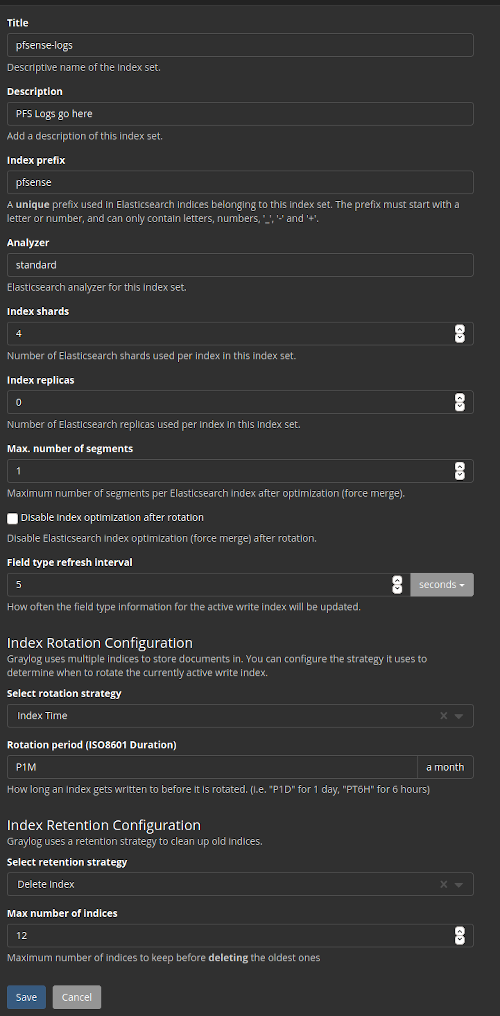
Next we have to create the Index in Elasticsearch for the pfSense logs in System / Indices
|
Next we have to create the Index in Elasticsearch for the pfSense logs in System / Indices
|
||||||
|
|
||||||

|
|
||||||
|
|
||||||
|
|
||||||
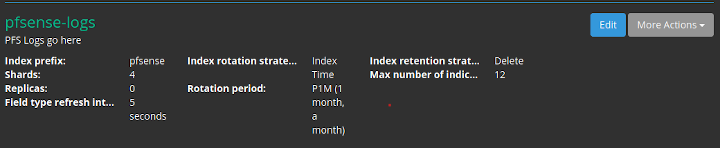
Index shard 4 and Index replicas 0, the rotation of the Index time index and the retention can be deleted, closure of an index according to the maximum number of indices or doing nothing. In my case, I set it to rotate monthly and eliminate the indexes after 12 months. In short there are many ways to establish the rotation. This index is created immediately.
|
Index shard 4 and Index replicas 0, the rotation of the Index time index and the retention can be deleted, closure of an index according to the maximum number of indices or doing nothing. In my case, I set it to rotate monthly and eliminate the indexes after 12 months. In short there are many ways to establish the rotation. This index is created immediately.
|
||||||
|
|
||||||

|
|
||||||
|
|
||||||
# 3. GeoIP Plugin activation
|
# 3. GeoIP Plugin activation
|
||||||
|
|
||||||
@@ -120,7 +139,7 @@ In Graylog go to System->Configurations and:
|
|||||||
|
|
||||||
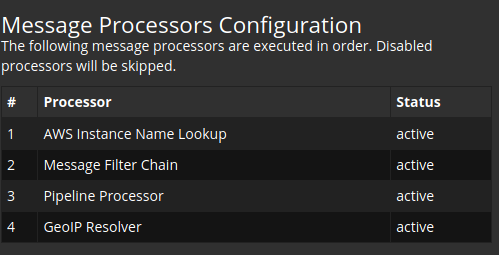
This should look like:
|
This should look like:
|
||||||
|
|
||||||

|
|
||||||
|
|
||||||
|
|
||||||
2. In the Plugins section update enable the Geo-Location Processor
|
2. In the Plugins section update enable the Geo-Location Processor
|
||||||
@@ -134,11 +153,11 @@ This content pack includes Input rsyslog type , extractors, lookup tables, Data
|
|||||||
|
|
||||||
We can take it from the Git directory or sideload it from github to the Workstation you do the deployment on:
|
We can take it from the Git directory or sideload it from github to the Workstation you do the deployment on:
|
||||||
|
|
||||||
https://raw.githubusercontent.com/lephisto/pfsense-analytics/master/pfsense_content_pack/graylog3/pfanalytics.json
|
https://raw.githubusercontent.com/lephisto/pfsense-analytics/master/pfsense_content_pack/graylog4/pfanalytics.json
|
||||||
|
|
||||||
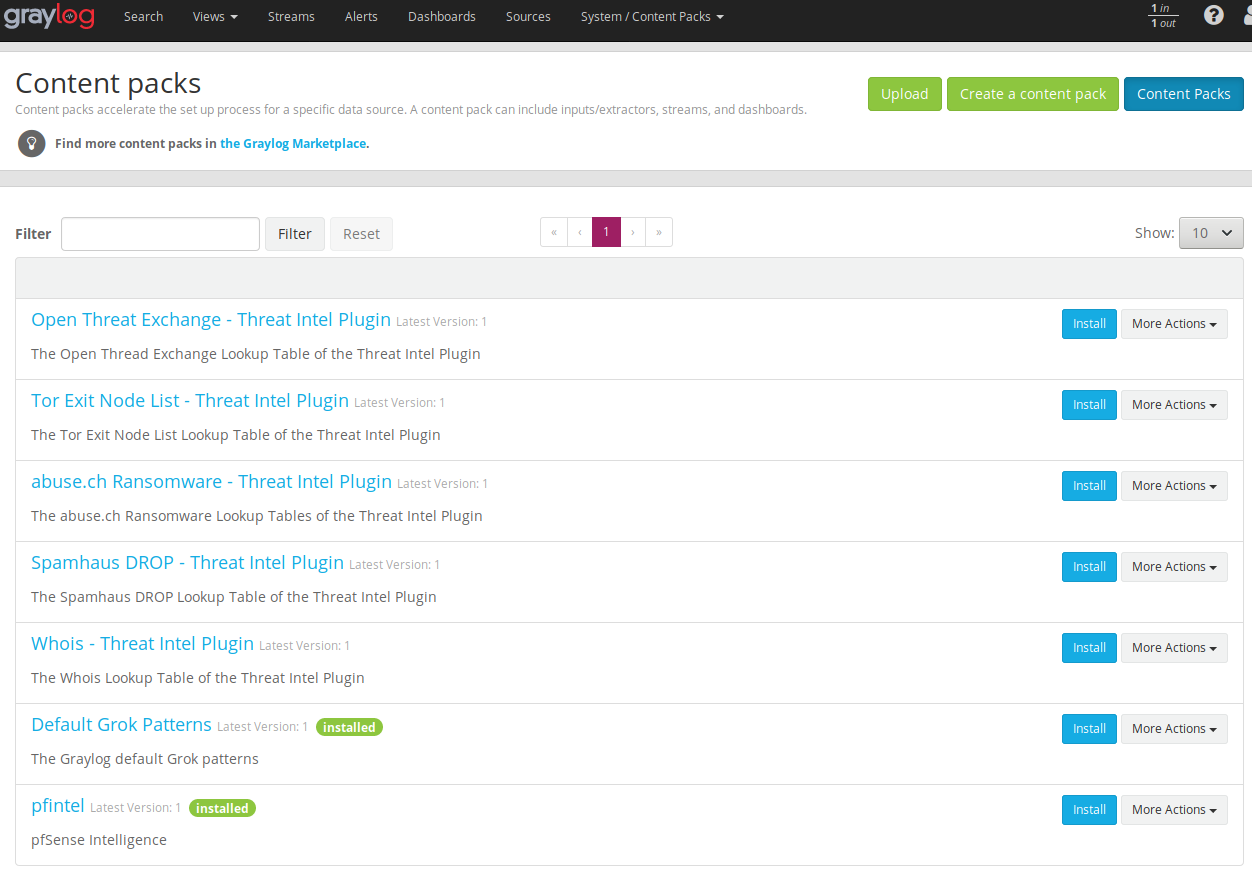
Once it's uploaded, press the Install button. If everthing went well it should look like:
|
Once it's uploaded, press the Install button. If everthing went well it should look like:
|
||||||
|
|
||||||
|

|
||||||
|
|
||||||
Note the "pfintel" on the bottom of the list.
|
Note the "pfintel" on the bottom of the list.
|
||||||
|
|
||||||
@@ -157,7 +176,7 @@ As previously explained, by default graylog for each index that is created gener
|
|||||||
|
|
||||||
Get the Index Template from the GIT repo you cloned or sideload it from:
|
Get the Index Template from the GIT repo you cloned or sideload it from:
|
||||||
|
|
||||||
https://raw.githubusercontent.com/lephisto/pfsense-graylog/master/Elasticsearch_pfsense_custom_template/pfsense_custom_template_es6.json
|
https://raw.githubusercontent.com/lephisto/pfsense-analytics/master/Elasticsearch_pfsense_custom_template/pfsense_custom_template_es7.json
|
||||||
|
|
||||||
To import personalized template open cerebro and will go to more/index template
|
To import personalized template open cerebro and will go to more/index template
|
||||||
|
|
||||||
@@ -191,7 +210,7 @@ Once this procedure is done, we don't need Cerebro for daily work, so it could b
|
|||||||
|
|
||||||
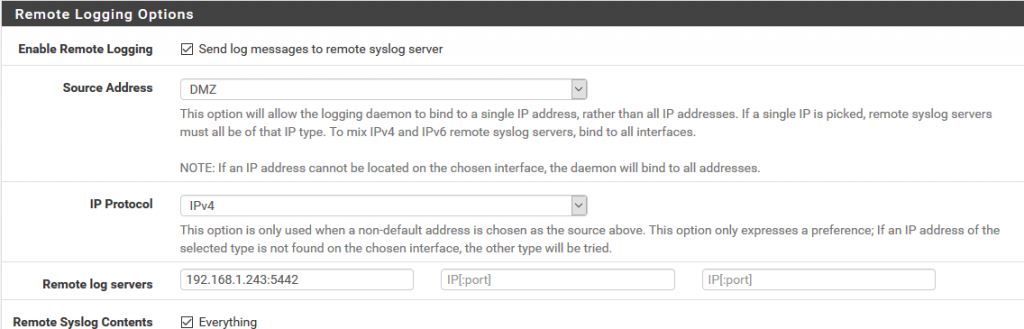
We will now prepare Pfsense to send logs to graylog and for this in Status/System Logs/ Settings we will modify the options that will allow us to do so.
|
We will now prepare Pfsense to send logs to graylog and for this in Status/System Logs/ Settings we will modify the options that will allow us to do so.
|
||||||
|
|
||||||
We go to the Remote Logging Options section and in Remote log servers we specify the ip address and the port prefixed in the content pack in the pfsense input of graylog that in this case 5442.
|
We go to the Remote Logging Options section and in Remote lo7g servers we specify the ip address and the port prefixed in the content pack in the pfsense input of graylog that in this case 5442.
|
||||||
|
|
||||||
|

|
||||||
|
|
||||||
@@ -241,4 +260,18 @@ Configure according your needs, I propose following Settings:
|
|||||||
| Datebase Top Talker Storage | 365d | |
|
| Datebase Top Talker Storage | 365d | |
|
||||||
|
|
||||||
|
|
||||||
|
# Disable Cerebro.
|
||||||
|
|
||||||
|
Since Cerebro is mainly used for applying a custom Index Template, we don't need it in our daily routine and we can disable it. Edit your docker-compose.yml and remove the comment in the service block for Cerebro:
|
||||||
|
|
||||||
|
```
|
||||||
|
cerebro:
|
||||||
|
image: lmenezes/cerebro
|
||||||
|
entrypoint: ["echo", "Service cerebro disabled"]
|
||||||
|
```
|
||||||
|
|
||||||
|
No need to restart the whole Stack, just stop Cerebro:
|
||||||
|
|
||||||
|
`sudo docker-compose stop cerebro`
|
||||||
|
|
||||||
That should do it. Check your DPI Dashboard and enjoy :)
|
That should do it. Check your DPI Dashboard and enjoy :)
|
||||||
|
|||||||
@@ -1,71 +0,0 @@
|
|||||||
## You should always set the min and max JVM heap
|
|
||||||
## size to the same value. For example, to set
|
|
||||||
## the heap to 4 GB, set:
|
|
||||||
##
|
|
||||||
## -Xms4g
|
|
||||||
## -Xmx4g
|
|
||||||
##
|
|
||||||
## See https://www.elastic.co/guide/en/elasticsearch/reference/current/heap-size.html
|
|
||||||
## for more information
|
|
||||||
##
|
|
||||||
################################################################
|
|
||||||
|
|
||||||
# Xms represents the initial size of total heap space
|
|
||||||
# Xmx represents the maximum size of total heap space
|
|
||||||
|
|
||||||
-Xms2g
|
|
||||||
-Xmx2g
|
|
||||||
|
|
||||||
################################################################
|
|
||||||
## Expert settings
|
|
||||||
################################################################
|
|
||||||
##
|
|
||||||
## All settings below this section are considered
|
|
||||||
## expert settings. Don't tamper with them unless
|
|
||||||
## you understand what you are doing
|
|
||||||
##
|
|
||||||
################################################################
|
|
||||||
|
|
||||||
## GC configuration
|
|
||||||
-XX:+UseConcMarkSweepGC
|
|
||||||
-XX:CMSInitiatingOccupancyFraction=75
|
|
||||||
-XX:+UseCMSInitiatingOccupancyOnly
|
|
||||||
|
|
||||||
## optimizations
|
|
||||||
|
|
||||||
# pre-touch memory pages used by the JVM during initialization
|
|
||||||
-XX:+AlwaysPreTouch
|
|
||||||
|
|
||||||
## basic
|
|
||||||
|
|
||||||
# force the server VM (remove on 32-bit client JVMs)
|
|
||||||
-server
|
|
||||||
# explicitly set the stack size (reduce to 320k on 32-bit client JVMs)
|
|
||||||
-Xss1m
|
|
||||||
|
|
||||||
# set to headless, just in case
|
|
||||||
-Djava.awt.headless=true
|
|
||||||
|
|
||||||
# ensure UTF-8 encoding by default (e.g. filenames)
|
|
||||||
-Dfile.encoding=UTF-8
|
|
||||||
|
|
||||||
# use our provided JNA always versus the system one
|
|
||||||
-Djna.nosys=true
|
|
||||||
|
|
||||||
# use old-style file permissions on JDK9
|
|
||||||
-Djdk.io.permissionsUseCanonicalPath=true
|
|
||||||
|
|
||||||
# flags to configure Netty
|
|
||||||
-Dio.netty.noUnsafe=true
|
|
||||||
-Dio.netty.noKeySetOptimization=true
|
|
||||||
-Dio.netty.recycler.maxCapacityPerThread=0
|
|
||||||
|
|
||||||
# log4j 2
|
|
||||||
-Dlog4j.shutdownHookEnabled=false
|
|
||||||
-Dlog4j2.disable.jmx=true
|
|
||||||
-Dlog4j.skipJansi=true
|
|
||||||
## heap dumps
|
|
||||||
# generate a heap dump when an allocation from the Java heap fails
|
|
||||||
# heap dumps are created in the working directory of the JVM
|
|
||||||
|
|
||||||
-XX:+HeapDumpOnOutOfMemoryError
|
|
||||||
5115
pfsense_content_pack/graylog4/pfanalytics.json
Normal file
5115
pfsense_content_pack/graylog4/pfanalytics.json
Normal file
File diff suppressed because it is too large
Load Diff
BIN
screenshots/SS_Contentpacks.png
Normal file
BIN
screenshots/SS_Contentpacks.png
Normal file

Binary file not shown.
|
After Width: | Height: | Size: 176 KiB |

Binary file not shown.
|
Before Width: | Height: | Size: 90 KiB |
BIN
screenshots/SS_Indexcreation4.png
Normal file
BIN
screenshots/SS_Indexcreation4.png
Normal file

Binary file not shown.
|
After Width: | Height: | Size: 178 KiB |
BIN
screenshots/SS_Indexcreation_done.png
Normal file
BIN
screenshots/SS_Indexcreation_done.png
Normal file

Binary file not shown.
|
After Width: | Height: | Size: 30 KiB |

Binary file not shown.
|
Before Width: | Height: | Size: 36 KiB |
BIN
screenshots/SS_processorsequence4.png
Normal file
BIN
screenshots/SS_processorsequence4.png
Normal file

Binary file not shown.
|
After Width: | Height: | Size: 28 KiB |
Reference in New Issue
Block a user